help(“modules”)¶ 开发准备
-
首先确认当前固件的依赖包完整。
-
结果如下图所示。如果图中没有这两个依赖包,请烧录最新固件。
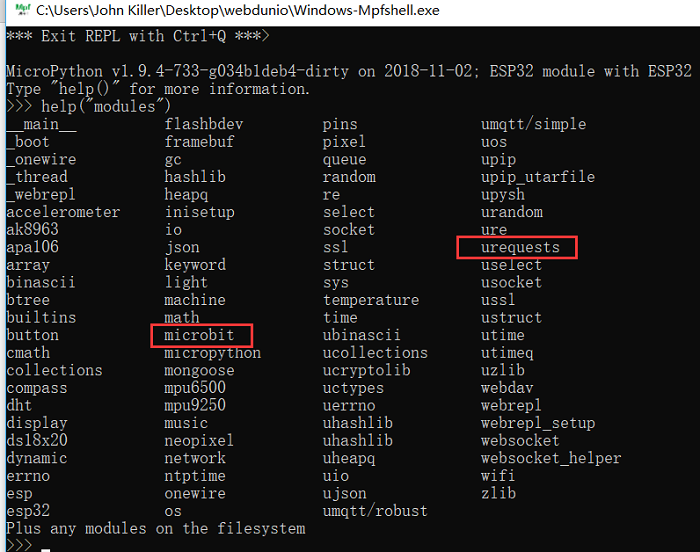
确保您已连接到互联网。如果没有,请参阅 2 WiFi 无线连接
¶ 准备天气 API
-
本例使用中国天气网 API:http://www.weather.com.cn/data/cityinfo/101200801.html ,其中 101200801 为荆州市城市 ID。城市 ID 列表:http://mobile.weather.com.cn/js/citylist.xml
-
请求返回的 JSON 数据示例
{ "weatherinfo": { "city": "jingzhou", "cityid": "101200801", "img1": "n7.gif", "img2": "d2.gif", "ptime": "18:00", "temp1": "16℃", "temp2": "23℃", "weather": "Rain turns shade" } }分析这些 JSON 数据后,可以编写如下示例。
¶ 示例分析
import urequests
from microbit import *

def get_weather():
	url = "http://www.weather.com.cn/data/cityinfo/101200801.html"
	rsp = urequests.get(url)
	data = eval(rsp.text) # eval function is used to convert string type json data from -> to python dictionary type
	weather = data["weatherinfo"]
	L = weather["temp1"] #lowest temperature
	H = weather["temp2"] #the highest temperature
	return "L:" + L[:-1] + " H:" + H[:-1] #Data sample->  L:16 H:23

display.scroll(get_weather())

# L[:-1] H[:-1]Remove ℃ ℉ and two special symbol, can appear otherwise coding errors¶ 补充说明
以上操作均在 mpfshell 中完成。使用 PyCharm 编程时,也可以配合 mpfshell 工具进行文件操作。