¶ 简介
BPI-P2 Pro 采用 Rockchip RK3308B-S,配备 64 位四核 ARM Cortex-A35 处理器,并提供 USB、以太网、Bluetooth、无线连接和语音检测引擎。RK3308 拥有丰富的音频接口(如 MIC/PDM/SPDIF/I2S),非常适合物联网和语音应用。BPI-P2 Pro 配备 512 MB DDR3 内存,并使用 eMMC 或 SD 卡存储操作系统。
¶ 开发
¶ 准备
-
5 V/3 A USB Type-C 电源
-
容量至少为 8 GB 的 SD/TF 卡
-
波特率:1500000
-
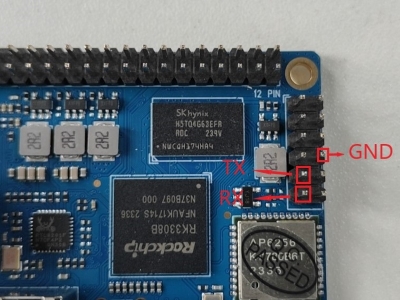
调试接口:
¶ 选择烧录方法
| 烧录方法:为 Rockchip 芯片烧录系统镜像 |
¶ 100M 以太网
使用有线以太网时,请将网线插入 ArmSoM-P2 Pro 的 RJ45 接口;网口指示灯闪烁表示硬件连接正常。
手动配置以太网
切换到 root 用户:
sudo su使用 ifconfig 命令检查以太网是否正常工作。命令应显示 eth0 网卡及其 IP 地址;还可以使用 ping 判断网络是否连通。
ifconfig
ping www.baidu.com如果无法 ping 通,请尝试
$ sudo dhclient eth0¶ 调试串口
调试串口位于 12 针排座的 9 号和 11 号引脚。
| P2pro | 连接方式 | 串口模块 |
|---|---|---|
GND(引脚 8) |
←-→ |
GND |
TX(引脚 9) |
←-→ |
RX |
RX(引脚 11) |
←-→ |
TX |

¶ Wi-Fi
如果使用 “ifconfig” 无法看到 “wlan0”,可能是驱动尚未加载。
-
首先,执行
find / -name bcmdhd.ko查询驱动程序路径。
-
然后加载驱动:
insmod /system/lib/modules/bcmdhd.ko
-
执行后,使用 “ifconfig” 应能看到 “wlan0”。
¶ Bluetooth
# 1. 启动 Bluetooth
root@linaro-alip:/# service bluetooth start
# 2. 进入 bluetoothctl
root@linaro-alip:/# bluetoothctl
# 3. 输入以下命令进行连接
root@linaro-alip:/# power on
root@linaro-alip:/# agent on
root@linaro-alip:/# default-agent
root@linaro-alip:/# scan on
root@linaro-alip:/# pair yourDeviceMAC¶ 音频
查看系统中的声卡:
root@linaro-alip:~# aplay -l
**** List of PLAYBACK Hardware Devices ****
card 0: rockchiprk3308a [rockchip,rk3308-acodec], device 0: dailink-multicodecs ff560000.acodec-0 [dailink-multicodecs ff560000.acodec-0]
  Subdevices: 1/1
  Subdevice #0: subdevice #0
card 7: Loopback [Loopback], device 0: Loopback PCM [Loopback PCM]
  Subdevices: 8/8
  Subdevice #0: subdevice #0
  Subdevice #1: subdevice #1
  Subdevice #2: subdevice #2
  Subdevice #3: subdevice #3
  Subdevice #4: subdevice #4
  Subdevice #5: subdevice #5
  Subdevice #6: subdevice #6
  Subdevice #7: subdevice #7
card 7: Loopback [Loopback], device 1: Loopback PCM [Loopback PCM]
  Subdevices: 8/8
  Subdevice #0: subdevice #0
  Subdevice #1: subdevice #1
  Subdevice #2: subdevice #2
  Subdevice #3: subdevice #3
  Subdevice #4: subdevice #4
  Subdevice #5: subdevice #5
  Subdevice #6: subdevice #6
Subdevice #7: subdevice #7播放音频:
root@linaro-alip:/# aplay -D plughw:0,0 ./usr/share/sounds/alsa/Rear_Right.wav¶ USB 接口
BPI-P2 Pro 提供 1 个 USB 2.0 接口。
¶ 麦克风接口
查看内置编解码器的全部增益项:
amixer contents如果耳机输出音量过低:
查看编解码器当前左右声道输出增益:
amixer cget name='DAC HPOUT Left Volume'
amixer cget name='DAC HPOUT Right Volume'根据需要调整基本增益:
amixer cset name='DAC HPOUT Left Volume' 18
amixer cset name='DAC HPOUT Right Volume' 18调节音量(百分比):
amixer cset name='Master Playback Volume' 40录音
调整内置编解码器的麦克风增益:
第 0 组:mic1/mic2;第 1 组:mic3/mic4;第 2 组:mic5/mic6;第 3 组:mic7/mic8
前缀 “ADC MIC” 表示调节前级 MIC PGA 的线性增益。
前缀 “ADC ALC” 表示调节后级 ALC 的线性增益。
amixer cset name='ADC MIC Group 0 Right Gain'  3
amixer cset name='ADC MIC Group 0 Left Gain'  3
amixer cset name='ADC ALC Group 0 Left Volume'  31
amixer cset name='ADC ALC Group 0 Right Volume'  31

amixer cset name='ADC MIC Group 1 Right Gain'  3
amixer cset name='ADC MIC Group 1 Left Gain'  3
amixer cset name='ADC ALC Group 1 Left Volume'  31
amixer cset name='ADC ALC Group 1 Right Volume'  31

amixer cset name='ADC MIC Group 2 Right Gain'  3
amixer cset name='ADC MIC Group 2 Left Gain'  3
amixer cset name='ADC ALC Group 2 Left Volume'  31
amixer cset name='ADC ALC Group 2 Right Volume'  31

amixer cset name='ADC MIC Group 3 Right Gain'  3
amixer cset name='ADC MIC Group 3 Left Gain'  3
amixer cset name='ADC ALC Group 3 Left Volume'  31
amixer cset name='ADC ALC Group 3 Right Volume'  31

export ALSA_LIB_ADD_GAIN=3

// 采样率高于 16000 Hz 时,录音命令应添加参数 --period-size=1024 --buffer-size=4096
arecord -D hw:0,0 -c 8 -r 44100 -f S16_LE --period-size=1024 --buffer-size=4096 test.wav