¶ Introduction
BPI-SM10(K3-CoM260) supports a variety of operating systems and development kits, including the native Bianbu system, Ubuntu operating system, Linux and OpenHarmony, etc., with AI full-stack development kits, it can meet the diverse development needs of AI.
BPI-SM10(K3-CoM260) provides a rich interface, Covers MIPI-DSI, MIPI-CSI, DP 1.2, SDIO 3.0, eSPI, SPI, I2S, I2C, CAN-FD, PWM, UART, USB 2.0, USB 3.0, PCIe 3.0, GMAC, etc. With its high performance and rich interface resources, K3-CoM260 is a better choice for RISC-V end-side application solutions and product development.
| More Infomation: Banana Pi BPI-SM10 Main Page |
¶ Specifications
-
Superior CPU Performance
Eight high-performance computing cores (X100) combined with eight AI cores (A100) deliver over 130 KDMIPS of CPU computing power. The X100 single-core SPECint2006 performance is >9.0/GHz, with a maximum clock speed of 2.4 GHz.
-
Homogeneous AI Computing Power
Provides 60 TOPS of AI computing power, leveraging ultra-wide parallel computing AI cores to offer powerful general-purpose AI computing power, enabling rapid integration with all mainstream AI ecosystems. It boasts 7B local large-model computing power > 10 Tokens/s.
-
Latest RISC-V Architecture, Super Parallel Computing Capabilities
The A100 supports up to 1024-bit RVV 1.0 parallel computing and the latest RVA23 Profile and Vector Crypto standards.
-
Rich I/O Expansion Interfaces
Integrates multiple high-speed expansion interfaces to flexibly meet various computer expansion needs: 8-lane PCIe, 3 USB 3.0 ports, 1 GMAC port, etc.
-
Complete Hardware Virtualization
Features complete hardware virtualization technology, supporting RV Hypervisor 1.0 expansion, RV AIA expansion, and RV IOMMU expansion, providing complete hardware virtualization for CPU, memory, interrupts, and I/O.
-
Advanced Security Defense Technology
Supports M/S/U processor privileges; supports hardware resistance against Spectre and Meltdown attacks; supports Chinese national cryptographic standards 2, 3, and 4 hardware security technologies.
-
Industry-Grade Compliance
CPU cores, multi-level cache, and SRAM support ECC design, providing stable and reliable continuous computing power output even in ambient temperatures ranging from -40˚C to 85˚C, meeting the harsh environmental requirements of industrial applications.
¶ Development
¶ Prepare
-
Prepare a TTL cable, a 12V/5A or 19V/2.37A DC power supply, USB cable, and a minimum of 8G TF card.
-
Download the corresponding image to your PC and prepare to burn it.
-
Install and download the burning software.
¶ Serial port debugging
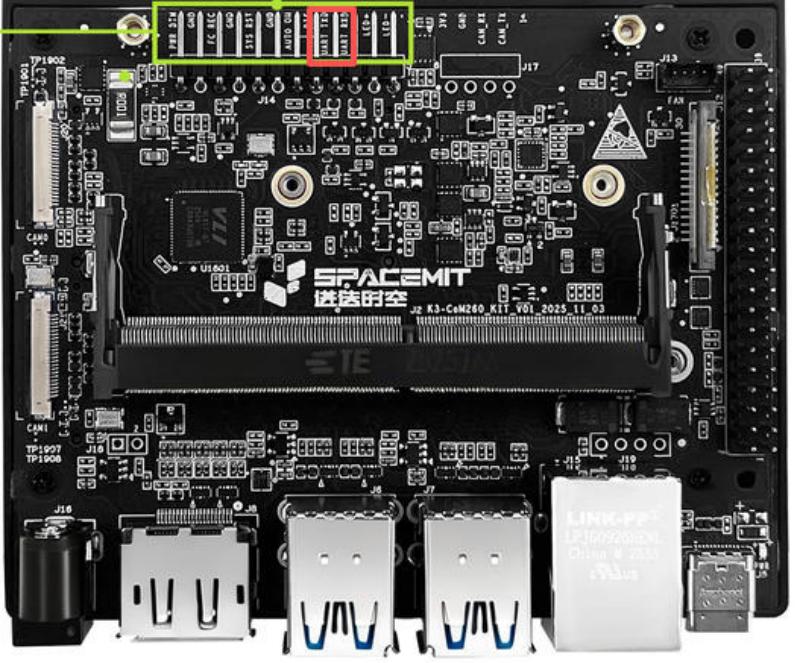
Please connect the host computer to the TX, RX and GND pins of the 12-pin interface on the BPI-SM10(K3-CoM260) carrier board correctly via a USB-to-TTL adapter.
-
Open the host computer’s serial port debugging software, select the serial port, and set the baud rate to 115200.
-
Connect the serial cable and power the board using a DC power supply.
-
The host computer’s serial port software should then function normally.
¶ Entering Flashing Mode
Before entering flashing mode, please prepare two buttons, one for shorting FC_REC and GND, and the other for shorting SYS_RST and GND.
¶ power-off state
-
Press and hold the FC_REC button.
-
Connect the power adapter to power on the device.
-
Release the FC_REC button.
-
Connect the development board’s Type-C interface to the host computer using a Type-C data cable.
-
Use the Titan flashing tool or execute the fastboot command to flash the firmware.
¶ power-on state
-
Press and hold the FC_REC button.
-
Briefly press the RST button.
-
Release the FC_REC button.
-
Connect the development board’s Type-C port to the host computer using a Type-C data cable.
-
Use the Titan flashing tool or execute the fastboot command to flash the firmware.
¶ Start burning
¶ Burn to onboard
-
Install and open the Titan burning software.
-
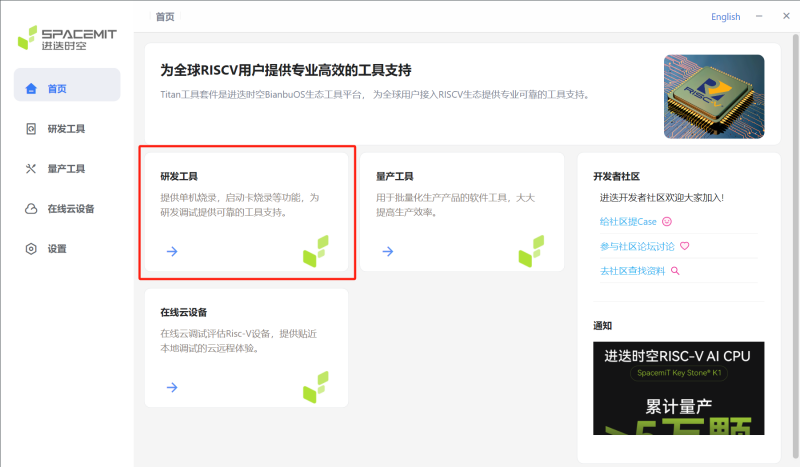
Click on the R&D Tools on the homepage to be redirected to the R&D Tools interface.
-
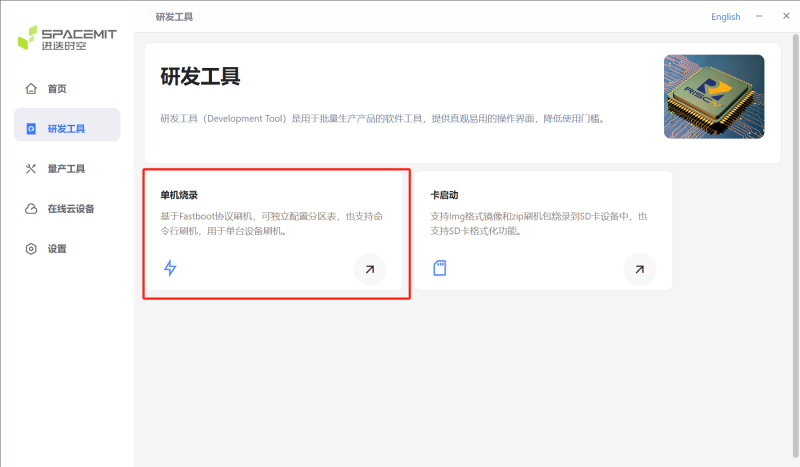
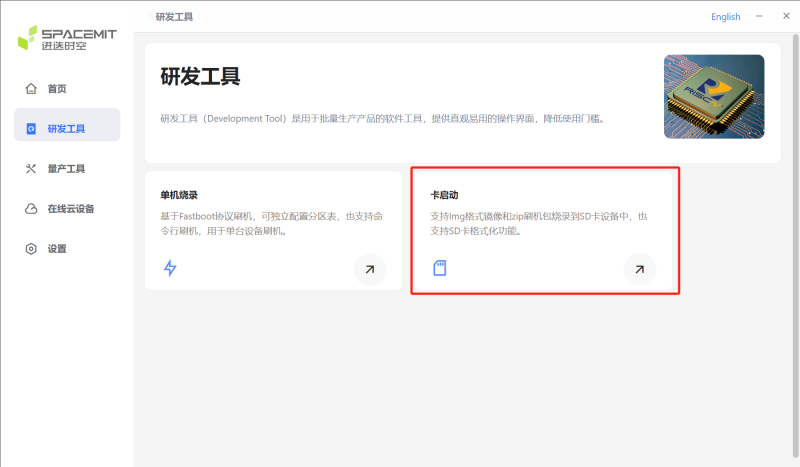
The R&D tools page has stand-alone burning options and card boot options; here, we choose the stand-alone burning option.
-
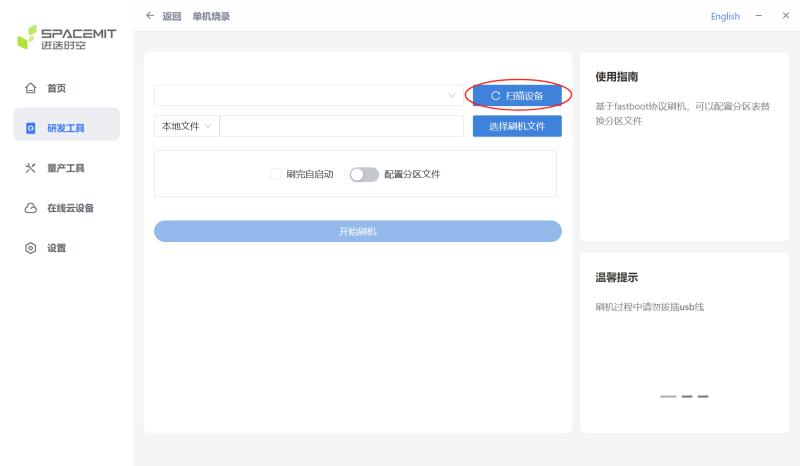
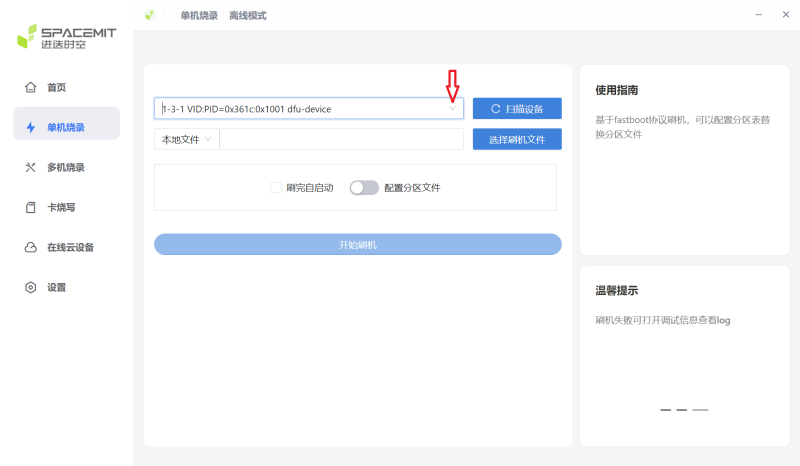
Follow the steps to enter the burning mode,click "Scan Device," and select the target device.
-
Select the device to be burned.
-
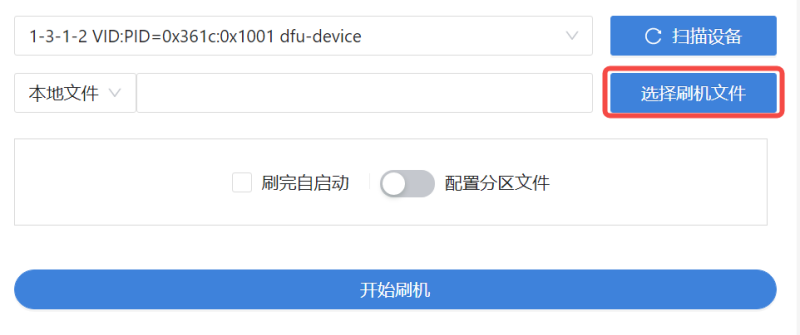
Select the file to burn
-
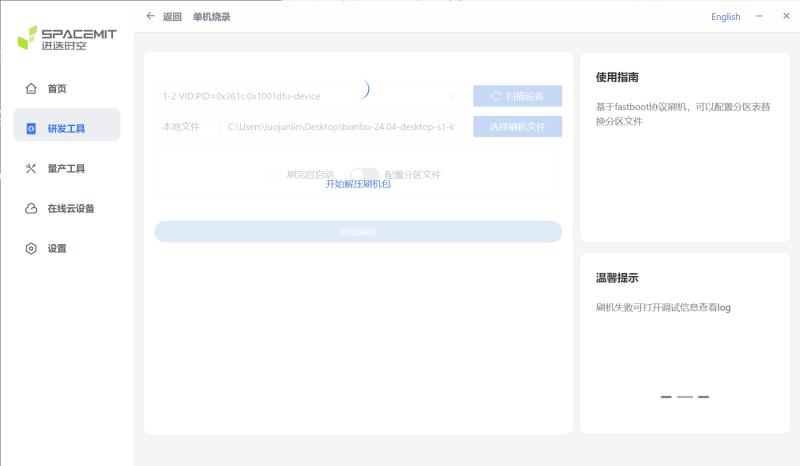
Waiting for decompression
-
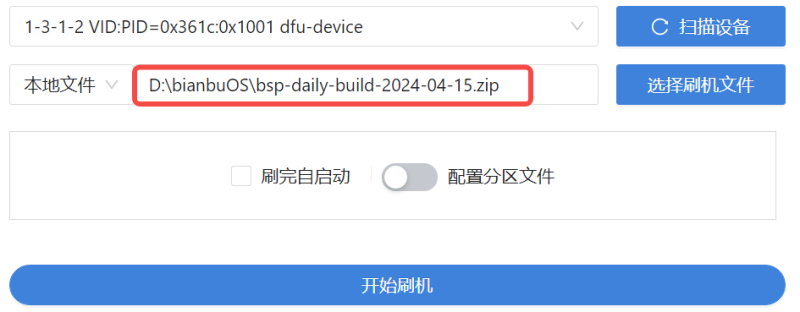
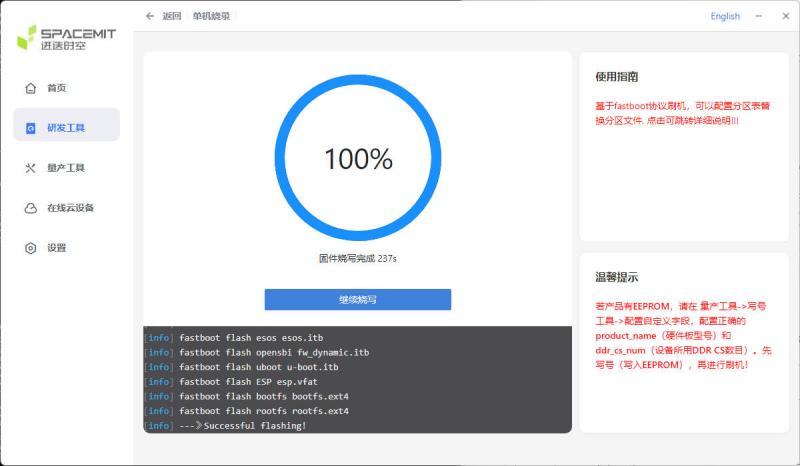
After decompression, click "Start Flashing".
-
The appearance of "Successful flashing!" indicates that the burning process is complete.
¶ Burn to SDcard
-
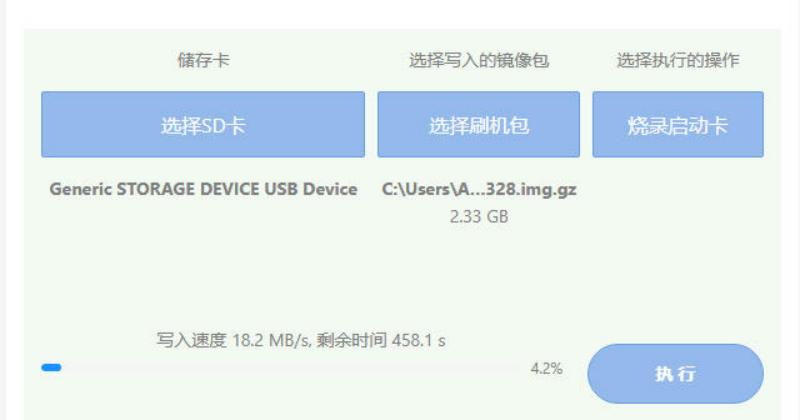
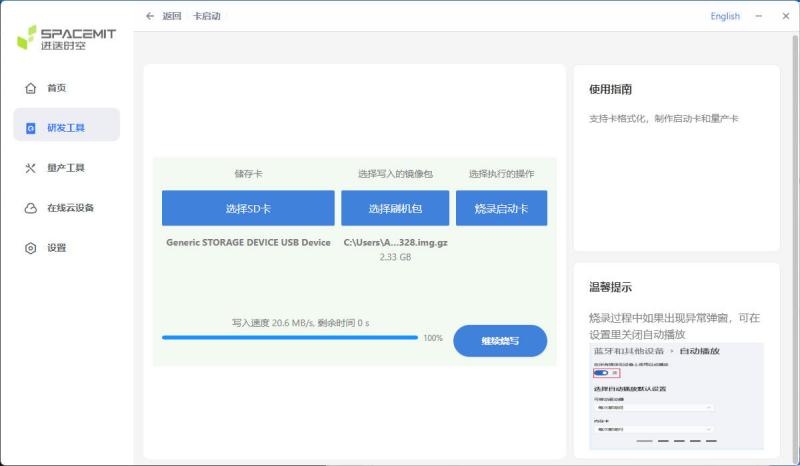
Similarly, open the Tian software and click "Card Boot" to open the SD card burning interface.
-
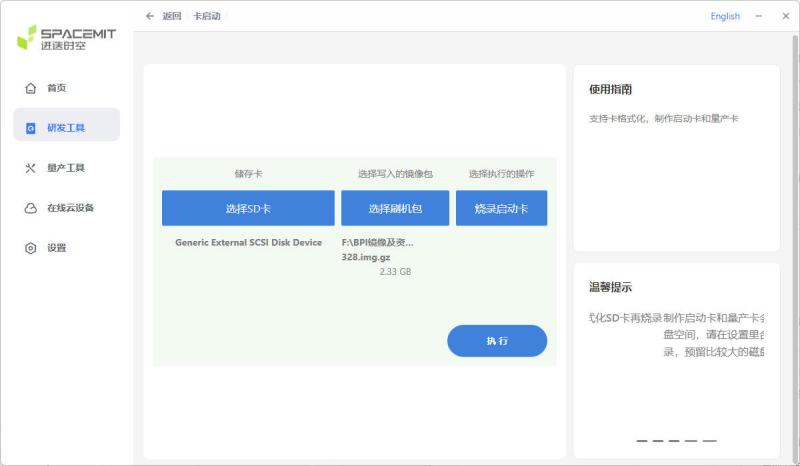
select your SD card storage and the image you want to burn
-
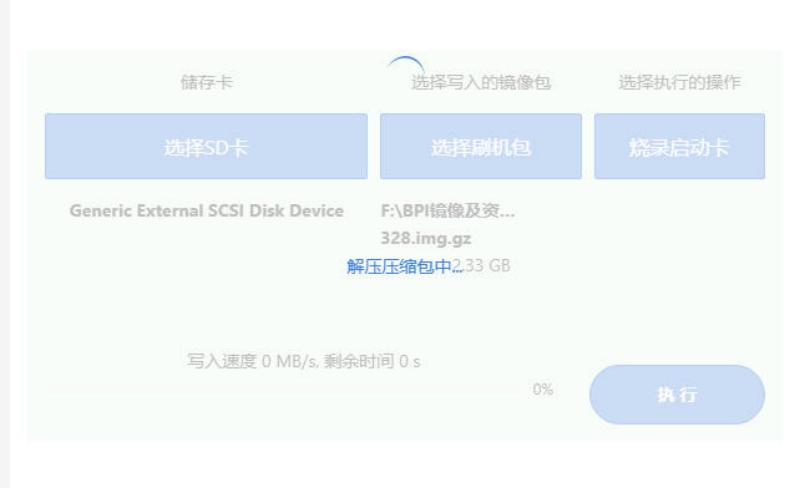
Click "Execute" and wait for decompression.
-
After decompression, the burning process will begin.
-
The burning process is complete when it reaches 100%.
¶ RJ45 interface
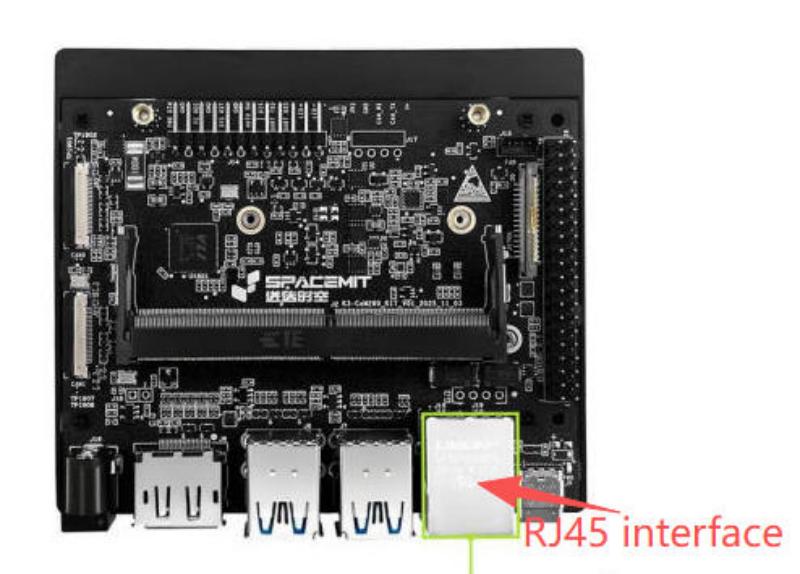
Connect the network cable to the RJ45 port, and the system will automatically obtain an IP address and be able to access the external network.
root@k3:~# ifconfig
end1: flags=4163<UP,BROADCAST,RUNNING,MULTICAST>  mtu 1500
        inet 10.168.1.217  netmask 255.255.255.0  broadcast 10.168.1.255
        inet6 fe80::7611:efda:6a9c:82a  prefixlen 64  scopeid 0x20<link>
        inet6 fd0b:9aaf:b1a:0:b96f:ebf9:bb0b:3799  prefixlen 64  scopeid 0x0<global>
        inet6 fd0b:9aaf:b1a:0:5ca4:965a:fc72:5422  prefixlen 64  scopeid 0x0<global>
        ether fe:fe:fe:2a:78:3c  txqueuelen 1000  (以太网)
        RX packets 169  bytes 23868 (23.8 KB)
        RX errors 0  dropped 8  overruns 0  frame 0
        TX packets 122  bytes 14625 (14.6 KB)
        TX errors 0  dropped 0 overruns 0  carrier 0  collisions 0
        device interrupt 51  base 0xa000

lo: flags=73<UP,LOOPBACK,RUNNING>  mtu 65536
        inet 127.0.0.1  netmask 255.0.0.0
        inet6 ::1  prefixlen 128  scopeid 0x10<host>
        loop  txqueuelen 1000  (本地环回)
        RX packets 103471  bytes 7522335 (7.5 MB)
        RX errors 0  dropped 0  overruns 0  frame 0
        TX packets 103471  bytes 7522335 (7.5 MB)
        TX errors 0  dropped 0 overruns 0  carrier 0  collisions 0

wlP4p1s0: flags=4099<UP,BROADCAST,MULTICAST>  mtu 1500
        ether 0c:cd:d0:8d:4e:30  txqueuelen 1000  (以太网)
        RX packets 0  bytes 0 (0.0 B)
        RX errors 0  dropped 0  overruns 0  frame 0
        TX packets 0  bytes 0 (0.0 B)
        TX errors 0  dropped 0 overruns 0  carrier 0  collisions 0

root@k3:~# ping baidu.com
PING baidu.com (110.242.74.102) 56(84) bytes of data.
64 bytes from 110.242.74.102: icmp_seq=1 ttl=50 time=52.6 ms
64 bytes from 110.242.74.102: icmp_seq=2 ttl=50 time=66.2 ms
64 bytes from 110.242.74.102: icmp_seq=3 ttl=50 time=46.3 ms
64 bytes from 110.242.74.102: icmp_seq=4 ttl=50 time=44.6 ms
64 bytes from 110.242.74.102: icmp_seq=5 ttl=50 time=51.1 ms
64 bytes from 110.242.74.102: icmp_seq=6 ttl=50 time=44.9 ms
64 bytes from 110.242.74.102: icmp_seq=7 ttl=50 time=51.4 ms
64 bytes from 110.242.74.102: icmp_seq=8 ttl=50 time=44.6 ms
64 bytes from 110.242.74.102: icmp_seq=9 ttl=50 time=44.9 ms
64 bytes from 110.242.74.102: icmp_seq=10 ttl=50 time=50.5 ms
64 bytes from 110.242.74.102: icmp_seq=11 ttl=50 time=44.6 ms
64 bytes from 110.242.74.102: icmp_seq=12 ttl=50 time=44.7 ms

--- baidu.com ping statistics ---
12 packets transmitted, 12 received, 0% packet loss, time 15237ms
rtt min/avg/max/mdev = 44.582/48.871/66.243/6.053 ms¶ WiFi
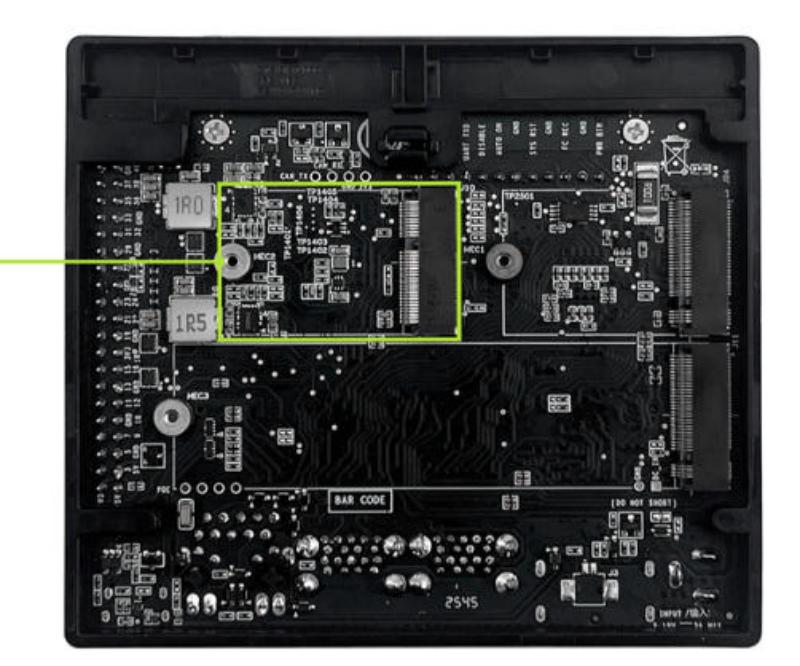
The BPI-SM10(K3 CoM260) development kit supports access to the M.2 2230 E-Key module, enabling wireless network and Bluetooth functionality.
-
Connect the module to the M.2 KEY E interface.
-
Start the system and use lspci to query modules.
root@k3:~# lspci 0000:00:00.0 PCI bridge: SpacemiT X100 PCIe Root Complex (rev 01) 0003:00:00.0 PCI bridge: SpacemiT X100 PCIe Root Complex (rev 01) 0004:00:00.0 PCI bridge: SpacemiT X100 PCIe Root Complex (rev 01) 0004:01:00.0 Network controller: Realtek Semiconductor Co., Ltd. RTL8852BE PCIe 802.11ax Wireless Network Controller -
Use the nmcli command to check the surrounding WiFi network.
root@k3:~# nmcli device wifi list IN-USE BSSID SSID MODE CHAN RATE SIGNAL BARS SECURITY FC:A0:5A:07:00:72 BPI-FAE Infra 9 1170 Mbit/s 100 ▂▄▆█ WPA2 WPA3 FE:A0:5A:57:00:72 BPI-FAE-5G Infra 56 1170 Mbit/s 100 ▂▄▆█ WPA2 WPA3 00:0C:43:26:60:D0 BPI-R4-2.4G Infra 6 1170 Mbit/s 77 ▂▄▆_ -- 00:0C:43:26:60:A8 BPI-R4-5G Infra 36 405 Mbit/s 75 ▂▄▆_ -- 1C:11:52:8A:C3:57 BPI-FT_5G Infra 149 1170 Mbit/s 74 ▂▄▆_ WPA2 WPA3 3C:67:84:04:DD:E8 chen-MIFI_DDE8 Infra 60 1170 Mbit/s 67 ▂▄▆_ WPA2 54:A3:1B:28:69:BE BPI-RD_Center Infra 1 270 Mbit/s 65 ▂▄▆_ WPA2 D8:32:14:7E:EF:E5 Tenda_7EEFE0_5G Infra 153 1170 Mbit/s 65 ▂▄▆_ WPA1 WPA2 C0:11:52:77:F4:9A BPI-FT Infra 2 1170 Mbit/s 60 ▂▄▆_ WPA2 WPA3 84:E5:D8:00:B2:15 MohenClass Infra 149 1170 Mbit/s 60 ▂▄▆_ WPA2 4C:EF:56:82:95:1B mohen Infra 44 1170 Mbit/s 57 ▂▄▆_ WPA2 90:B9:42:CD:56:D8 ZHongDi Infra 6 1170 Mbit/s 54 ▂▄__ WPA2 4C:EF:56:02:95:1B mohen Infra 11 1170 Mbit/s 54 ▂▄__ WPA2 54:A3:1B:28:69:BF BPI-RD_Center-5g Infra 36 1170 Mbit/s 52 ▂▄__ WPA2 D8:32:14:7E:EF:E1 Tenda_7EEFE0 Infra 8 130 Mbit/s 50 ▂▄__ WPA1 WPA2 AA:3B:76:CC:95:EA DIRECT-ea-HP 2606 LaserJet Tank Infra 36 65 Mbit/s 50 ▂▄__ WPA2 92:F0:52:3C:FE:91 cc Infra 1 1170 Mbit/s 45 ▂▄__ WPA2 WPA3 90:B9:42:CD:55:30 ZHongDi Infra 6 1170 Mbit/s 39 ▂▄__ WPA2 92:B9:42:7D:56:D9 -- Infra 40 270 Mbit/s 29 ▂___ WPA2 WPA3 -
Connect to WiFi
root@k3:~# nmcli device wifi connect "BPI-FAE" password "xxxx" 设备 "wlP4p1s0" 成功以 "7227dc15-6a29-4582-98fe-43d1c2b50016" 激活。 -
Connection successful, IP address obtained.
root@k3:~# nmcli
wlP4p1s0:已连接 到 BPI-FAE
        "Realtek RTL8852BE 802.11ax"
        wifi (rtw89_8852be), 0C:CD:D0:8D:4E:30, 硬件, mtu 1500
        inet4 10.168.1.107/24
        route4 10.168.1.0/24 metric 600
        route4 default via 10.168.1.1 metric 600
        inet6 fd0b:9aaf:b1a:0:af91:b9f7:af83:a12d/64
        inet6 fd0b:9aaf:b1a:0:fd60:b4fa:7472:e935/64
        inet6 fe80::25fa:1374:9e85:aa8c/64
        route6 fe80::/64 metric 1024
        route6 fd0b:9aaf:b1a::/64 metric 600
        route6 fd0b:9aaf:b1a::/48 via fe80::fea0:5aff:fe07:70 metric 600
¶ BT
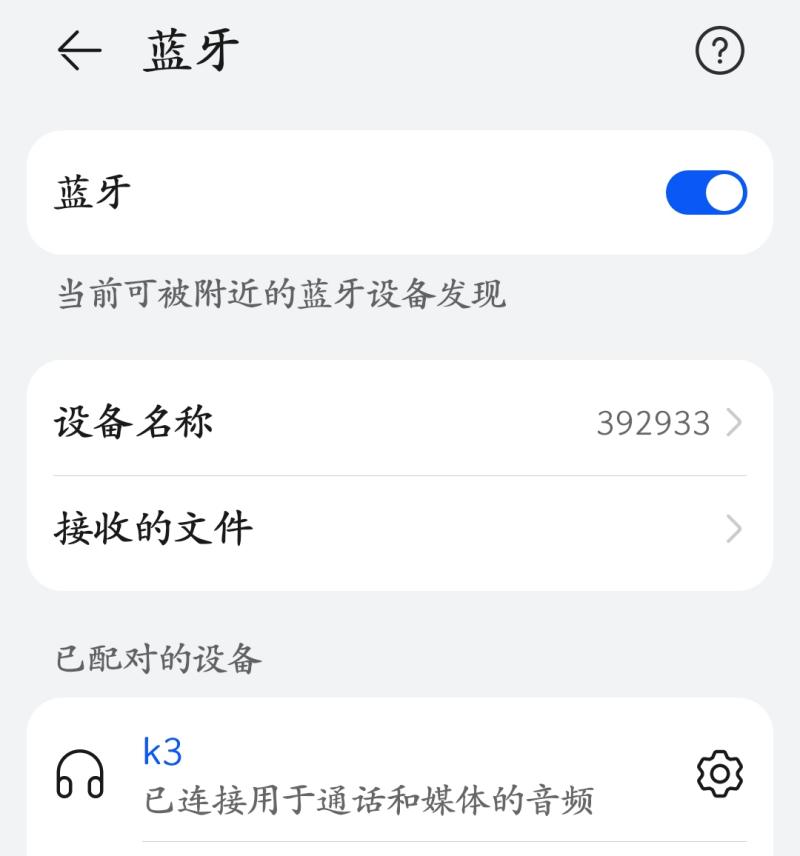
The BPI-SM10(K3 CoM260) development kit supports access to the M.2 2230 E-Key module, enabling wireless network and Bluetooth functionality.
root@k3:~# bluetoothctl
[NEW] Media /org/bluez/hci0
        SupportedUUIDs: 0000110a-0000-1000-8000-00805f9b34fb
        SupportedUUIDs: 0000110b-0000-1000-8000-00805f9b34fb
Agent registered
[CHG] Controller 0C:CD:D0:8D:4E:31 Pairable: yes
hci0 new_settings: powered bondable ssp br/edr le secure-conn wide-band-speech cis-central cis-peripheral
[bluetoothctl]>
[bluetoothctl]>power on //Turn on Bluetooth
[bluetoothctl]> scan on  //Scan for surrounding Bluetooth
[bluetoothctl]> agent on //Enable Proxy
Agent is already registered

[bluetoothctl]> discoverable on  //Set Bluetooth to visible
hci0 new_settings: powered connectable bondable ssp br/edr le secure-conn wide-band-speech cis-central cis-peripheral
[CHG] Controller 0C:CD:D0:8D:4E:31 Connectable: yes
hci0 new_settings: powered connectable discoverable bondable ssp br/edr le secure-conn wide-band-speech cis-central cis-peripheral
Changing discoverable on succeeded
[CHG] Controller 0C:CD:D0:8D:4E:31 Discoverable: yes

// Connect to K3 via Bluetooth on the device

hci0 28:64:B0:83:6F:73 type BR/EDR connected eir_len 13
[NEW] Device 28:64:B0:83:6F:73 392933
Request confirmation
[agent] Confirm passkey 140038 (yes/no): yes
hci0 new_link_key 28:64:B0:83:6F:73 type 0x05 pin_len 0 store_hint 1
hci0 device_flags_changed: 28:64:B0:83:6F:73 (BR/EDR)
     supp: 0x00000001  curr: 0x00000000
[CHG] Device 28:64:B0:83:6F:73 Bonded: yes
[CHG] Device 28:64:B0:83:6F:73 UUIDs: 0000111f-0000-1000-8000-00805f9b34fb
[CHG] Device 28:64:B0:83:6F:73 Modalias: bluetooth:v010Fp107Ed1436
[CHG] Device 28:64:B0:83:6F:73 UUIDs: 0000046a-0000-1000-8000-00805f9b34fb
[CHG] Device 28:64:B0:83:6F:73 UUIDs: 00001105-0000-1000-8000-00805f9b34fb
[CHG] Device 28:64:B0:83:6F:73 UUIDs: 0000110a-0000-1000-8000-00805f9b34fb
[CHG] Device 28:64:B0:83:6F:73 UUIDs: 0000110c-0000-1000-8000-00805f9b34fb
[CHG] Device 28:64:B0:83:6F:73 UUIDs: 00001112-0000-1000-8000-00805f9b34fb
[CHG] Device 28:64:B0:83:6F:73 UUIDs: 00001115-0000-1000-8000-00805f9b34fb
[CHG] Device 28:64:B0:83:6F:73 UUIDs: 00001116-0000-1000-8000-00805f9b34fb
[CHG] Device 28:64:B0:83:6F:73 UUIDs: 0000111f-0000-1000-8000-00805f9b34fb
[CHG] Device 28:64:B0:83:6F:73 UUIDs: 0000112f-0000-1000-8000-00805f9b34fb
[CHG] Device 28:64:B0:83:6F:73 UUIDs: 00001132-0000-1000-8000-00805f9b34fb
[CHG] Device 28:64:B0:83:6F:73 UUIDs: 00001200-0000-1000-8000-00805f9b34fb
[CHG] Device 28:64:B0:83:6F:73 UUIDs: 00001800-0000-1000-8000-00805f9b34fb
[CHG] Device 28:64:B0:83:6F:73 UUIDs: 00001801-0000-1000-8000-00805f9b34fb
[CHG] Device 28:64:B0:83:6F:73 UUIDs: 0000fdd1-0000-1000-8000-00805f9b34fb
[CHG] Device 28:64:B0:83:6F:73 UUIDs: 0000fe35-0000-1000-8000-00805f9b34fb
[CHG] Device 28:64:B0:83:6F:73 UUIDs: 11c8b310-80e4-4276-afc0-f81590b2177f
[CHG] Device 28:64:B0:83:6F:73 UUIDs: 8ce255c0-200a-11e0-ac64-0800200c9a66
[CHG] Device 28:64:B0:83:6F:73 UUIDs: 9664aa26-d76c-43ad-9775-d310f253a408
[CHG] Device 28:64:B0:83:6F:73 ServicesResolved: yes
[CHG] Device 28:64:B0:83:6F:73 Paired: yes
Authorize service
[agent] Authorize service 0000111e-0000-1000-8000-00805f9b34fb (yes/no): yess
Authorize service
[agent] Authorize service 0000110d-0000-1000-8000-00805f9b34fb (yes/no): yes
[CHG] Device 28:64:B0:83:6F:73 UUIDs: 0000046a-0000-1000-8000-00805f9b34fb
[CHG] Device 28:64:B0:83:6F:73 UUIDs: 00001105-0000-1000-8000-00805f9b34fb
[CHG] Device 28:64:B0:83:6F:73 UUIDs: 0000110a-0000-1000-8000-00805f9b34fb
[CHG] Device 28:64:B0:83:6F:73 UUIDs: 0000110c-0000-1000-8000-00805f9b34fb
[CHG] Device 28:64:B0:83:6F:73 UUIDs: 0000110d-0000-1000-8000-00805f9b34fb
[CHG] Device 28:64:B0:83:6F:73 UUIDs: 00001112-0000-1000-8000-00805f9b34fb
[CHG] Device 28:64:B0:83:6F:73 UUIDs: 00001115-0000-1000-8000-00805f9b34fb
[CHG] Device 28:64:B0:83:6F:73 UUIDs: 00001116-0000-1000-8000-00805f9b34fb
[CHG] Device 28:64:B0:83:6F:73 UUIDs: 0000111f-0000-1000-8000-00805f9b34fb
[CHG] Device 28:64:B0:83:6F:73 UUIDs: 0000112f-0000-1000-8000-00805f9b34fb
[CHG] Device 28:64:B0:83:6F:73 UUIDs: 00001132-0000-1000-8000-00805f9b34fb
[CHG] Device 28:64:B0:83:6F:73 UUIDs: 00001200-0000-1000-8000-00805f9b34fb
[CHG] Device 28:64:B0:83:6F:73 UUIDs: 00001800-0000-1000-8000-00805f9b34fb
[CHG] Device 28:64:B0:83:6F:73 UUIDs: 00001801-0000-1000-8000-00805f9b34fb
[CHG] Device 28:64:B0:83:6F:73 UUIDs: 0000fdd1-0000-1000-8000-00805f9b34fb
[CHG] Device 28:64:B0:83:6F:73 UUIDs: 0000fe35-0000-1000-8000-00805f9b34fb
[CHG] Device 28:64:B0:83:6F:73 UUIDs: 11c8b310-80e4-4276-afc0-f81590b2177f
[CHG] Device 28:64:B0:83:6F:73 UUIDs: 8ce255c0-200a-11e0-ac64-0800200c9a66
[CHG] Device 28:64:B0:83:6F:73 UUIDs: 9664aa26-d76c-43ad-9775-d310f253a408
[NEW] Transport /org/bluez/hci0/dev_28_64_B0_83_6F_73/fd0
[NEW] Endpoint /org/bluez/hci0/dev_28_64_B0_83_6F_73/sep1
[NEW] Endpoint /org/bluez/hci0/dev_28_64_B0_83_6F_73/sep2
[NEW] Endpoint /org/bluez/hci0/dev_28_64_B0_83_6F_73/sep3
[NEW] Player /org/bluez/hci0/dev_28_64_B0_83_6F_73/avrcp/player0 [default]
[CHG] Player /org/bluez/hci0/dev_28_64_B0_83_6F_73/avrcp/player0 Playlist is nil
[CHG] Player /org/bluez/hci0/dev_28_64_B0_83_6F_73/avrcp/player0 Type: Audio
[CHG] Player /org/bluez/hci0/dev_28_64_B0_83_6F_73/avrcp/player0 Subtype: None
[CHG] Player /org/bluez/hci0/dev_28_64_B0_83_6F_73/avrcp/player0 Status: paused
[CHG] Player /org/bluez/hci0/dev_28_64_B0_83_6F_73/avrcp/player0 Name: Bluetooth Player
[CHG] Player /org/bluez/hci0/dev_28_64_B0_83_6F_73/avrcp/player0 Repeat: off
[CHG] Player /org/bluez/hci0/dev_28_64_B0_83_6F_73/avrcp/player0 Shuffle: off
[CHG] Player /org/bluez/hci0/dev_28_64_B0_83_6F_73/avrcp/player0 Status: stopped
[CHG] Player /org/bluez/hci0/dev_28_64_B0_83_6F_73/avrcp/player0 Track.Title: Not Provided
[CHG] Player /org/bluez/hci0/dev_28_64_B0_83_6F_73/avrcp/player0 Track.TrackNumber: 0x00000001 (1)
[CHG] Player /org/bluez/hci0/dev_28_64_B0_83_6F_73/avrcp/player0 Track.NumberOfTracks: 0x00000001 (1)
[CHG] Player /org/bluez/hci0/dev_28_64_B0_83_6F_73/avrcp/player0 Track.Duration: 0x00000000 (0)
[CHG] Player /org/bluez/hci0/dev_28_64_B0_83_6F_73/avrcp/player0 Track.Title: Not Provided
[CHG] Player /org/bluez/hci0/dev_28_64_B0_83_6F_73/avrcp/player0 Track.TrackNumber: 0x00000001 (1)
[CHG] Player /org/bluez/hci0/dev_28_64_B0_83_6F_73/avrcp/player0 Track.NumberOfTracks: 0x00000001 (1)
[CHG] Player /org/bluez/hci0/dev_28_64_B0_83_6F_73/avrcp/player0 Track.Duration: 0x00000000 (0)
[CHG] Player /org/bluez/hci0/dev_28_64_B0_83_6F_73/avrcp/player0 Position: 0xffffffff (-1)
[CHG] Player /org/bluez/hci0/dev_28_64_B0_83_6F_73/avrcp/player0 Track.Title: Not Provided
[CHG] Player /org/bluez/hci0/dev_28_64_B0_83_6F_73/avrcp/player0 Track.TrackNumber: 0x00000001 (1)
[CHG] Player /org/bluez/hci0/dev_28_64_B0_83_6F_73/avrcp/player0 Track.NumberOfTracks: 0x00000001 (1)
[CHG] Player /org/bluez/hci0/dev_28_64_B0_83_6F_73/avrcp/player0 Track.Duration: 0x00000000 (0)
[CHG] Player /org/bluez/hci0/dev_28_64_B0_83_6F_73/avrcp/player0 Position: 0xffffffff (-1)
[CHG] Player /org/bluez/hci0/dev_28_64_B0_83_6F_73/avrcp/player0 Track.Title: Not Provided
[CHG] Player /org/bluez/hci0/dev_28_64_B0_83_6F_73/avrcp/player0 Track.TrackNumber: 0x00000001 (1)
[CHG] Player /org/bluez/hci0/dev_28_64_B0_83_6F_73/avrcp/player0 Track.NumberOfTracks: 0x00000001 (1)
[CHG] Player /org/bluez/hci0/dev_28_64_B0_83_6F_73/avrcp/player0 Track.Duration: 0x00000000 (0)
[CHG] Player /org/bluez/hci0/dev_28_64_B0_83_6F_73/avrcp/player0 Position: 0xffffffff (-1)
Authorize service
[agent] Authorize service 0000111e-0000-1000-8000-00805f9b34fb (yes/no): yes
hci0 new_settings: powered connectable bondable ssp br/edr le secure-conn wide-band-speech cis-central cis-peripheral
[CHG] Controller 0C:CD:D0:8D:4E:31 Discoverable: noBluetooth connection successful
¶ M.2 KEYM
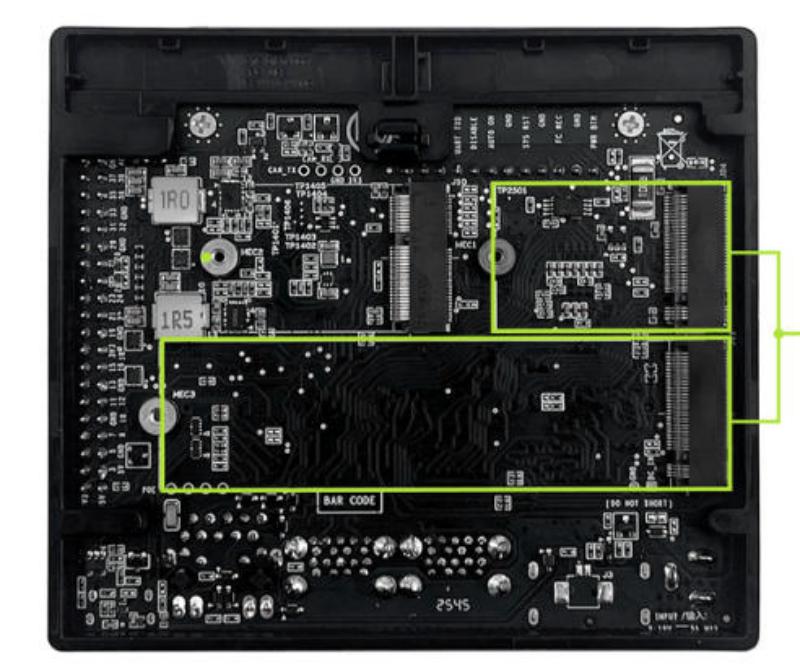
The BPI-SM10(K3 CoM260) development kit provides two M.2 M-Key interfaces, supporting NVMe SSDs of the 2280 (longer SSD in the diagram) and 2230 (shorter SSD in the diagram) form factors respectively, facilitating the connection of SSDs and other M.2 M-Key devices.
root@k3:~# lspci
0000:00:00.0 PCI bridge: SpacemiT X100 PCIe Root Complex (rev 01)
0000:01:00.0 Non-Volatile memory controller: SK hynix BC501 NVMe Solid State Drive
0003:00:00.0 PCI bridge: SpacemiT X100 PCIe Root Complex (rev 01)
0004:00:00.0 PCI bridge: SpacemiT X100 PCIe Root Complex (rev 01)
0004:01:00.0 Network controller: Realtek Semiconductor Co., Ltd. RTL8852BE PCIe 802.11ax Wireless Network Controller
root@k3:~# lsblk
NAME      MAJ:MIN RM   SIZE RO TYPE MOUNTPOINTS
sda         8:0    0 119.3G  0 disk
├─sda1      8:1    0   256M  0 part
├─sda2      8:2    0   256M  0 part /boot
└─sda3      8:3    0 118.8G  0 part /
mtdblock0  31:0    0     8M  0 disk
mtdblock1  31:1    0   128K  0 disk
mtdblock2  31:2    0   512K  0 disk
mtdblock3  31:3    0    64K  0 disk
mtdblock4  31:4    0     1M  0 disk
mtdblock5  31:5    0   384K  0 disk
mtdblock6  31:6    0   5.9M  0 disk
nvme0n1 259:0 0 119.2G 0 disk¶ USB
You can find the corresponding device by connecting the USB flash drive to the USB port, such as the sdb device below, with ID 05e3:0747.
root@k3:~# lsblk
NAME      MAJ:MIN RM   SIZE RO TYPE MOUNTPOINTS
sda         8:0    0 119.3G  0 disk
├─sda1      8:1    0   256M  0 part
├─sda2      8:2    0   256M  0 part /boot
└─sda3      8:3    0 118.8G  0 part /
sdb         8:16   1  59.5G  0 disk
└─sdb1      8:17   1  59.5G  0 part
mtdblock0  31:0    0     8M  0 disk
mtdblock1  31:1    0   128K  0 disk
mtdblock2  31:2    0   512K  0 disk
mtdblock3  31:3    0    64K  0 disk
mtdblock4  31:4    0     1M  0 disk
mtdblock5  31:5    0   384K  0 disk
mtdblock6  31:6    0   5.9M  0 disk
root@k3:~# lsusb
Bus 001 Device 001: ID 1d6b:0002 Linux Foundation 2.0 root hub
Bus 001 Device 002: ID 0bda:b85b Realtek Semiconductor Corp. Bluetooth Radio
Bus 002 Device 001: ID 1d6b:0002 Linux Foundation 2.0 root hub
Bus 002 Device 002: ID 2109:2817 VIA Labs, Inc. USB2.0 Hub
Bus 002 Device 004: ID 2109:8817 VIA Labs, Inc. USB Billboard Device
Bus 003 Device 001: ID 1d6b:0003 Linux Foundation 3.0 root hub
Bus 003 Device 002: ID 2109:0817 VIA Labs, Inc. USB3.0 Hub
Bus 003 Device 003: ID 05e3:0747 Genesys Logic, Inc. USB Storage¶ GPIO Define
¶ 12 button pin define
| BPI-SM10 12 button pin define | |||
|---|---|---|---|
PIN |
PIN number |
PIN number |
Pin |
PC_LED- |
1 |
2 |
PC_LED+ |
UART0_RXD |
3 |
4 |
UART0_TXD |
BMCU_ACOK |
5 |
6 |
AUTO_ON_DIS |
GND |
7 |
8 |
PMIC_RST_OUTn |
GND |
9 |
10 |
FORCE_RECOVERY |
UART1_RTS_LS |
11 |
12 |
SLEEP/WAKE |
¶ 40 Pin GPIO define
| BPI-SM10 40 PIN GPIO define | |||
|---|---|---|---|
Pin |
PIN number |
PIN number |
Pin |
VDD_3V3_SYS |
1 |
2 |
VDD_5V_GPIO |
I2C3_SDA |
3 |
4 |
VDD_5V_GPIO |
I2C3_SCL |
5 |
6 |
GND |
GPIO09 |
7 |
8 |
UART1_TXD_LS |
GND |
9 |
10 |
UART1_RXD_LS |
UART1_RTS_LS |
11 |
12 |
I2S0_SCLK_LS |
R-SPI0_SCK_LS |
13 |
14 |
GND |
GPIO12_LS |
15 |
16 |
R-SPI0_CS1_LS |
VDD_3V3_SYS |
17 |
18 |
R-SPI0_CS_LS |
SPI0_MOSI_LS |
19 |
20 |
GND |
SPI0_MISO_LS |
21 |
22 |
R-SPI0_MISO_LS |
SPI0_SCK_LS |
23 |
24 |
SPI0_CS0_LS |
GND |
25 |
26 |
SPI0_CS1_LS |
I2C0_SDA |
27 |
28 |
I2C0_SCL |
GPIO01_LS |
29 |
30 |
GND |
GPIO11_LS |
31 |
32 |
GPIO07_LS |
GPIO13_LS |
33 |
34 |
GND |
I2S0_LRCK_LS |
35 |
36 |
UART1_CTS_LS |
R-SPI0_MOSI_LS |
37 |
38 |
I2S0_SDIN_LS |
GND |
39 |
40 |
I2S0_SDOUT_LS |
¶ MIPI CSI CAM0 define
| BPI-SM10 MIPI CSI CAM0 define | |||
|---|---|---|---|
Pin |
PIN number |
PIN number |
Pin |
VDD_3V3_SYS |
1 |
2 |
I2C4_SDA |
I2C4_SCL |
3 |
4 |
GND |
CLK_CAMCK |
5 |
6 |
CAM_PWDN |
GND |
7 |
8 |
MIPI_CSI0_DP1 |
MIPI_CSI0_DN1 |
9 |
10 |
GND |
MIPI_CSI0_DP0 |
11 |
12 |
MIPI_CSI0_DN0 |
GND |
13 |
14 |
MIPI_CSI1_CLKP |
MIPI_CSI1_CLKN |
15 |
16 |
GND |
MIPI_CSI1_DP1 |
17 |
18 |
MIPI_CSI1_DN1 |
GND |
19 |
20 |
MIPI_CSI1_DP0 |
MIPI_CSI1_DN0 |
21 |
22 |
GND |
¶ MIPI CSI CAM1 define
| BPI-SM10 MIPI CSI CAM1 define | |||
|---|---|---|---|
Pin |
PIN number |
PIN number |
Pin |
VDD_3V3_SYS |
1 |
2 |
I2C4_SDA |
I2C4_SCL |
3 |
4 |
GND |
CLK_CAMCK |
5 |
6 |
CAM_PWDN |
GND |
7 |
8 |
MIPI_CSI3_DP1 |
MIPI_CSI3_DN1 |
9 |
10 |
GND |
MIPI_CSI3_DP0 |
11 |
12 |
MIPI_CSI3_DN0 |
GND |
13 |
14 |
MIPI_CSI2_CLKP |
MIPI_CSI2_CLKN |
15 |
16 |
GND |
MIPI_CSI2_DP1 |
17 |
18 |
MIPI_CSI2_DN1 |
GND |
19 |
20 |
MIPI_CSI2_DP0 |
MIPI_CSI2_DN0 |
21 |
22 |
GND |
¶ MIPI DSI define
| BPI-SM10 MIPI DSI define | |||
|---|---|---|---|
Pin |
PIN number |
PIN number |
Pin |
GND |
1 |
2 |
GND |
MIPI_DSI1_LANE1_DN |
3 |
4 |
MIPI_DSI1_LANE1_DN |
MIPI_DSI1_LANE1_DP |
5 |
6 |
MIPI_DSI1_LANE1_DP |
GND |
7 |
8 |
GND |
MIPI_DSI1_CLK_N |
9 |
10 |
MIPI_DSI1_CLK_N |
MIPI_DSI1_CLK_P |
11 |
12 |
MIPI_DSI1_CLK_P |
GND |
13 |
14 |
GND |
MIPI_DSI1_LANE0_DN |
15 |
16 |
MIPI_DSI1_LANE0_DN |
MIPI_DSI1_LANE0_DP |
17 |
18 |
MIPI_DSI1_LANE0_DP |
GND |
19 |
20 |
GND |
I2C3_SCL |
21 |
22 |
I2C3_SCL |
I2C3_SDA |
23 |
24 |
I2C3_SDA |
GND |
25 |
26 |
GND |
LCD_VCC33 |
27 |
28 |
LCD_VCC33 |
LCD_VCC33 |
29 |
30 |
LCD_VCC33 |