¶ Overview
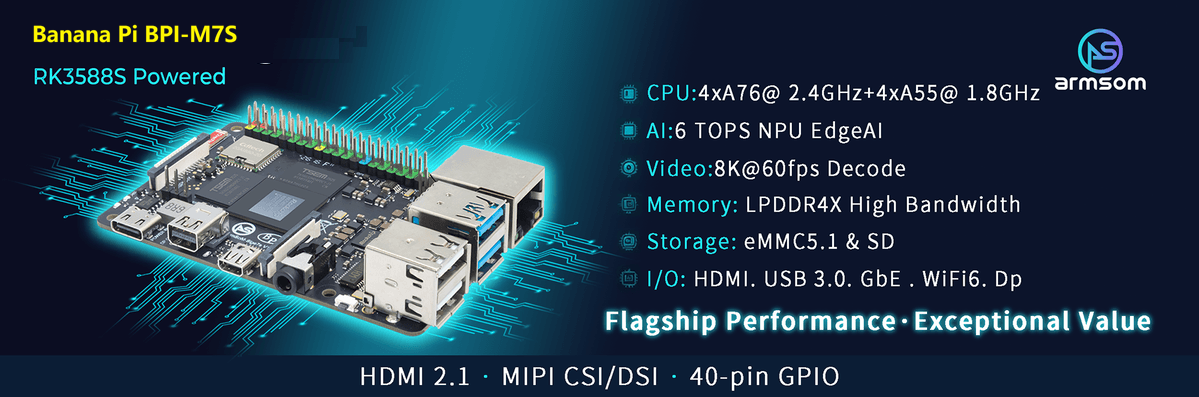
Banana Pi BPI-M7S (ArmSoM-Sige7) is powered by Rockchip’s latest flagship RK3588s,octa-core 64-bit processor, with a max frequency of 2.4GHz, a 6 TOPS NPU, and up to 32GB of RAM.
BPI-M7S is applied for various applications,such as, ARM PCs, edge computing, cloud servers, AI, cloud computing, virtual/augmented reality, blockchain, smart NVRs and more.
|
Rockchip RK3588 design Banana Pi BPI-M7 AI SBC design Rockchip RK3576 deisgn Banana Pi BPI-M5 Pro AI SBC design Rockchip RK3576 deisgn Banana Pi BPI-CM5 Pro AI core board kit design Rockchip RK3588s deisgn Banana Pi BPI-M7S AI SBC design Rockchip RK3588 design Banana Pi BPI-AIM7 Core board fully compatible with Jetson Nano/TX2 NX Rockchip RK3588 design Banana Pi BPI-W3 LGA core board kit Rockchip RK3588 design Banana Pi BPI-LM7 LGA core board Rockchip RK3588 design BPI-RK3588 core board and kit Introduction Core boards |
¶ Key Parameter
-
SoC: Rockchip RK3588s
-
CPU: 4x Cortex-A76 @ 2.4GHz + 4x Cortex-A55 @ 1.8GHz, 8nm
-
GPU: ARM Mali-G610 MP4
-
NPU: Up to 6 TOPS (INT8), supports INT4/INT8/INT16 mixed computing
-
VPU/Codec:
-
Hardware Decode: 8K@60fps H.265/VP9/AVS2, 8K@30fps H.264 AVC/MVC, 4K@60fps AV1, 1080P@60fps MPEG-2/-1/VC-1/VP8
-
Hardware Encode: 8K@30fps H.265 / H.264
-
-
RAM: 2GB/4GB/8GB/16GB/32GB (max 32GB) 64bit LPDDR4/LPDDR4x
-
Storage: 32GB/64GB/128GB eMMC Module
-
WIFI/BT: IEEE 802.11a/b/g/n/ac/ax WIFI6 and BT5 AP6275P
-
Operating Voltage: Wide input voltage, 5V to 23V (±5% tolerance)
-
Operating temperature: 0°C ~ 80°C
-
OS:
-
Official: Debian 11, Ubuntu 22.04, Ubuntu 24.04
-
3rd party: Armbian, Arch Linux, openSUSE
-
-
PCB: 12-layer
-
Weight: 46.6g
-
Size: 85 mm × 56 mm × 17 mm
¶ Getting started
¶ Hardware
¶ Hardware Interface
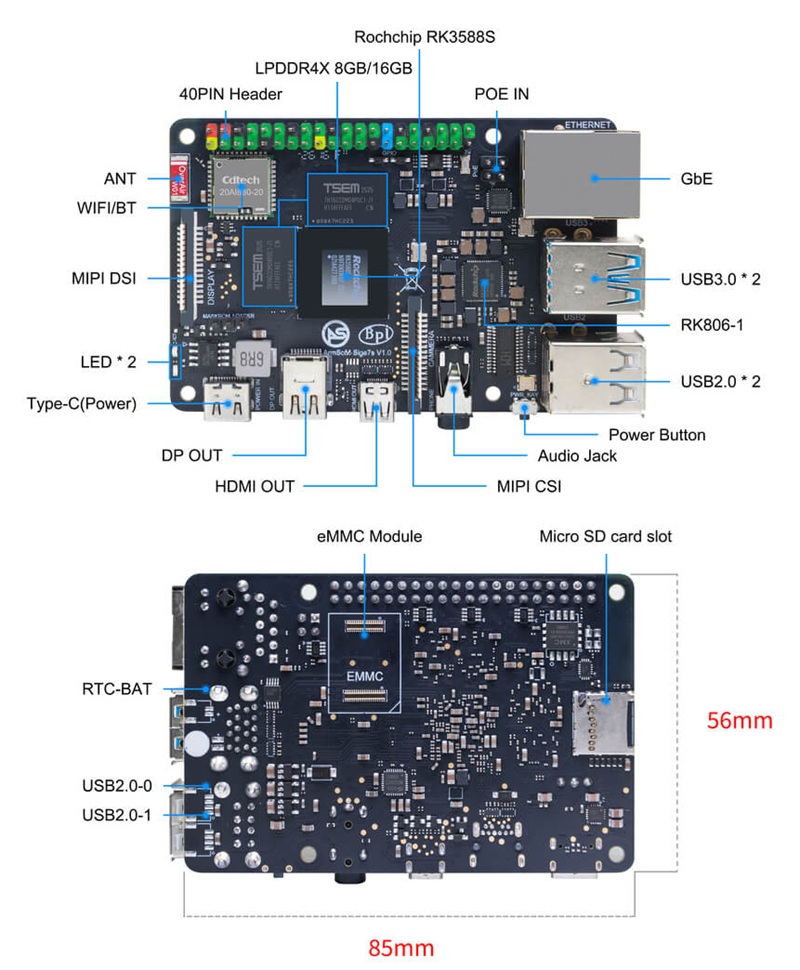
¶ BPI-M7S Photo
¶ Hardware Spec
| HardWare Specification of Banana Pi BPI-M7S | |
|---|---|
Category |
Functional Parameters |
SOC |
Rockchip RK3588s |
CPU |
RK3588s Quad-core Cortex-A76 @ 2.4GHz + Quad-core Cortex-A55 @ 1.8GHz, 8nm process |
GPU |
Mali-G610 MP4 GPU (4x256KB L2 Cache) |
Supports OpenGL ES3.2 / OpenCL2.2 / Vulkan1.1 |
|
NPU |
6 TOPS @ INT8 (3 NPU cores) |
Supports INT4 / INT8 / INT16 mixed operations |
|
Supports deep learning frameworks: TensorFlow, MXNet, PyTorch, Caffe, Tflite, Onnx NN, Android NN, etc. |
|
VPU / Codec |
Hardware Decoding: 8K @ 60fps H.265 / VP9 / AVS2, 8K @ 30fps H.264 AVC/MVC, 4K @ 60fps AV1, 1080P @ 60fps MPEG-2/-1 / VC-1 / VP8 |
Hardware Encoding: 8K @ 30fps H.265 / H.264 |
|
ISP |
Integrated 48MP ISP with HDR & 3DNR |
RAM |
8GB / 16GB / 32GB (Maximum configuration up to 32GB) 64-bit LPDDR4 / LPDDR4x |
Flash |
16GB / 32GB / 64GB / 128GB eMMC |
Supports MicroSD card expansion |
|
Networking |
Wi-Fi 6 + BT5.0 (AIC8800) |
Gigabit Ethernet port with PoE function (requires an additional PoE module) |
|
Video Output |
1x DP1.4 (2-Lane), supports up to 4K @ 60fps |
1x HDMI 2.1, supports up to 8K @ 60fps |
|
1x DSI (2-Lane), supports max 1280×800 display resolution |
|
Video Input |
1x CSI (2-Lane), supports up to 5MP camera input resolution |
Audio |
1x HDMI audio output |
1x HP-OUT (Headphone) audio output |
|
1x USB Type-C 3.0 (DP1.4) audio output |
|
USB Interfaces |
2x USB 3.0 (supports USB 3.1 Gen1) with data rates up to 5Gbps |
2x USB 2.0, supporting High-Speed (480Mbps), Full-Speed (12Mbps), and Low-Speed (1.5Mbps) modes |
|
40-PIN |
Fully compatible with the Raspberry Pi 40-pin header, allowing connection to a wide range of accessories and peripherals |
Supports UART / SPI / I2C / I2S / PWM / ADC / 5V Power / 3.3V Power |
|
Others |
1x Battery input connector for powering the low-power RTC chip (LK8563S) |
2x Status LEDs (Green LED lights up during normal system operation) |
|
Power Supply |
Wide range input voltage: 5V – 23V |
Buttons |
1x PWRON button (supports sleep/wake functionality) |
1x Maskrom button (supports entering Maskrom flashing mode) |
|
OS Support |
Official Support: Debian 12, Ubuntu 22.04, Ubuntu 24.04 |
Third-Party Support: Armbian |
|
Dimensions |
85 mm × 56 mm × 17 mm |
Operating Temp |
0°C ~ 80°C |
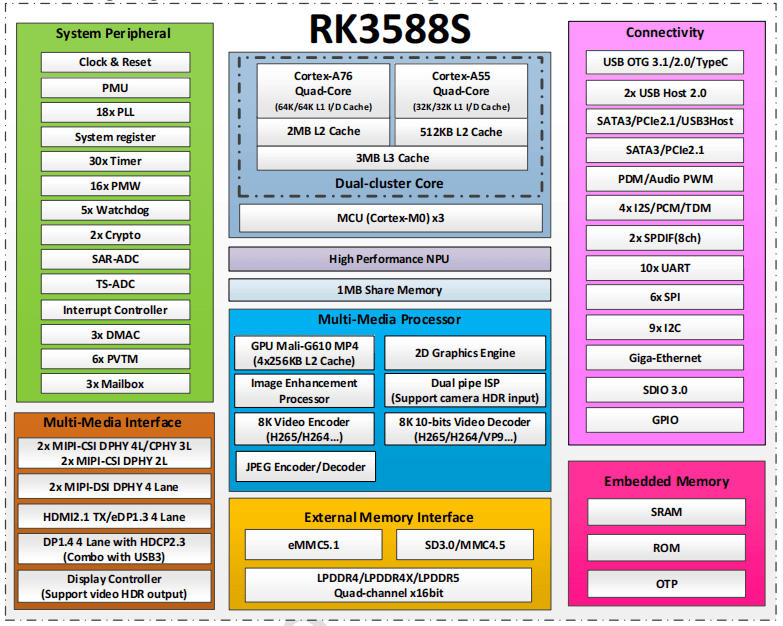
¶ RK3588s Block Diagram
¶ Hardware Pin Definitions
40 Pin GPIO
| 40 GPIO define of Banana Pi BPI-M7S | |||||
|---|---|---|---|---|---|
GPIO number |
Function |
Pin |
Pin |
Function |
GPIO number |
+3.3V |
1 |
2 |
+5.0V |
||
/dev/i2c1 |
sda I2C1_SDA \ GPIO0_D5 |
3 |
4 |
+5.0V |
|
/dev/i2c1 |
scl I2C1_SCL \ GPIO0_D4 |
5 |
6 |
GND |
|
47 |
GPIO1_B7 \ PWM3_M3 |
7 |
8 |
UART2_TX_M0 |
|
GND |
9 |
10 |
UART2_RX_M0 |
||
128 |
GPIO4_A0 |
11 |
12 |
GPIO1_A7 |
39 |
129 |
GPIO4_A1 |
13 |
14 |
GND |
|
130 |
GPIO4_A2 |
15 |
16 |
UART6_TX_M1 \ GPIO1_A1 |
/dev/ttyS2 uart txd |
+3.3V |
17 |
18 |
UART6_RX_M1 GPIO1_A0 |
/dev/ttyS2 uart rxd |
|
spi mosi |
SPI0_MOSI_M2 |
19 |
20 |
GND |
|
spi miso |
SPI0_MISO_M2 |
21 |
22 |
GPIO1_B0 |
40 |
spi clk |
SPI0_CLK_M2 |
23 |
24 |
spi cs 0 |
SPI0_CS0_M2 |
GND |
25 |
26 |
spi cs 1 |
SPI0_CS1_M2 |
|
/dev/i2c6 sda |
f2C6_SDA_M3 |
27 |
28 |
I2C6_SCL_M3 |
/dev/i2c6 scl |
131 |
GPIO4_A3 \ UART0_TXD_M2 |
29 |
30 |
GND |
|
132 |
GPIO4_A4 \ UART0_RXD_M2 |
31 |
32 |
PWM2 |
105 |
133 |
GPIO4_A5 \ UART3_TXD_M2 |
33 |
34 |
GND |
|
134 |
GPIO4_A6 \ UART3_RXD_M2 |
35 |
36 |
GPIO4_B2 \ CAN1_RXD_M1 |
138 |
135 |
GPIO4_A7 |
37 |
38 |
GPIO4_B3 \ CAN1_TXD_M1 |
139 |
GND |
39 |
40 |
GPIO3_C3 |
115 |
|
MIPI CSI
0.5mm FPC connector (J10)
| PIN | Name |
|---|---|
1 |
VCC_CAM(3.3v) |
2 |
I2C8_SDA_M2 |
3 |
I2C8_SCL_M2 |
4 |
CIF_CLKOUT |
5 |
PWDN_GPIO1_A6 |
6 |
GND |
7 |
MIPI_CSI_RX_CLK0P |
8 |
MIPI_CSI_RX_CLK0N |
9 |
GND |
10 |
MIPI_CSI_RX_D1P |
11 |
MIPI_CSI_RX_D1N |
12 |
GND |
13 |
MIPI_CSI_RX_D0P |
14 |
MIPI_CSI_RX_D0N |
15 |
GND |
MIPI DSI
0.5mm FPC connector (J11)
| PIN | Name |
|---|---|
1 |
VCC_MIPI |
2 |
VCC_MIPI |
3 |
GND |
4 |
I2C4_SDA_M3 |
5 |
I2C4_SCL_M3 |
6 |
GND |
7 |
MIPI_DSI_TX1_D0P |
8 |
MIPI_DSI_TX1_D0N |
9 |
GND |
10 |
MIPI_DSI_TX1_CLKP |
11 |
MIPI_DSI_TX1_CLKN |
12 |
GND |
13 |
MIPI_DSI_TX1_D1P |
14 |
MIPI_DSI_TX1_D1N |
15 |
GND |
VRTC
0.8mm connector(J18)
| Pin | Assignment | Description |
|---|---|---|
1 |
+ |
Positive pole |
2 |
- |
Negative pole |
¶ Resources
¶ SDK source code
-
Rockchip BSP source code: https://github.com/ArmSoM/manifests
-
Armbian: https://github.com/armbian/build
-
Rockchip Linux kernel: https://github.com/ArmSoM/rockchip-kernel
-
mainline linux kernel: https://github.com/torvalds/linux/blob/master/arch/arm64/boot/dts/rockchip/rk3588-armsom-sige7s.dts
-
RKNN-LLM: https://docs.armsom.org/zh/advanced-manual/rknn-llm
-
Forum discuss: https://forum.banana-pi.org/c/banana-pi-m7/bpi-m7s/144
¶ Image
-
Google driver general link, including software materials and hardware materials: https://drive.google.com/drive/folders/1yCLLLeaw6hHxT-3IH0bNf7DhjAf0BFbI
The following systems have been tested and verified by Banana Pi official:
| Description | Cloud drive path |
|---|---|
debian-bullseye debian12 for Sige7s :Debian 12 brings thousands of new and updated packages, supporting multiple desktop environments and processor architectures (including 32-bit and 64-bit PC, ARM, MIPS, and PowerPC). But one of the biggest changes is the upgrade of the Linux kernel from version 5.10 to version 6.1 LTS. |
ArmSoM→ArmSoM-Sige7s→software→Debianfirmware |
ubuntu ubuntu22.04 for Sige7s :Ubuntu 22.04, code-named 'Jammy Jellyfish', is a version officially released by Canonical on April 21, 2022. |
ArmSoM→ArmSoM-Sige7s→software→Ubuntufirmware |
¶ Supply Statement
The Banana Pi BPI-M7S will be produced at least until January 2034.
¶ Easy to buy sample
|
[Electrostatic Protection] 1. Before handling the device, please ensure you wear an anti-static wrist strap or take electrostatic discharge measures to prevent damage to the development board. 2. Assembly should be performed in an electrostatic-safe environment, avoiding operations in dry and low-humidity conditions. 3. When not in use, store the device in an anti-static bag and keep it in a suitably temperature-controlled, low-humidity environment to prevent static electricity buildup. 4. When handling the device, avoid friction or collisions to prevent the generation of static electricity that could cause damage. 5. When holding the device, try to avoid direct contact with the chips on the mainboard to prevent static damage. 6. Do not plug or unplug wires or other devices while the device is operating to avoid damage from electrical surges. 7. When connecting or disconnecting the GPIO/MIPI expansion interfaces, make sure to turn off the power and disconnect the power cable to prevent damage from electrical current. |
|
[Heat Management] Without effective cooling measures, the surface temperature of the main chip may exceed 60 degrees. When handling the device, please avoid direct contact with the SoC and surrounding power inductors to prevent burns. Ensure that the environment is well-ventilated during operation to prevent localized heat buildup, which could lead to overheating. Additionally, do not place the device in direct sunlight. It is recommended to choose between the official cooling fan, heat sink, or third-party cooling kits based on specific usage conditions to ensure optimal cooling performance. |